01 / SELL
Keep the queue moving.
Find items by barcode or name. Review quantities, prices and the amount due in the scanner or touch workspace.
Watch the guided demo →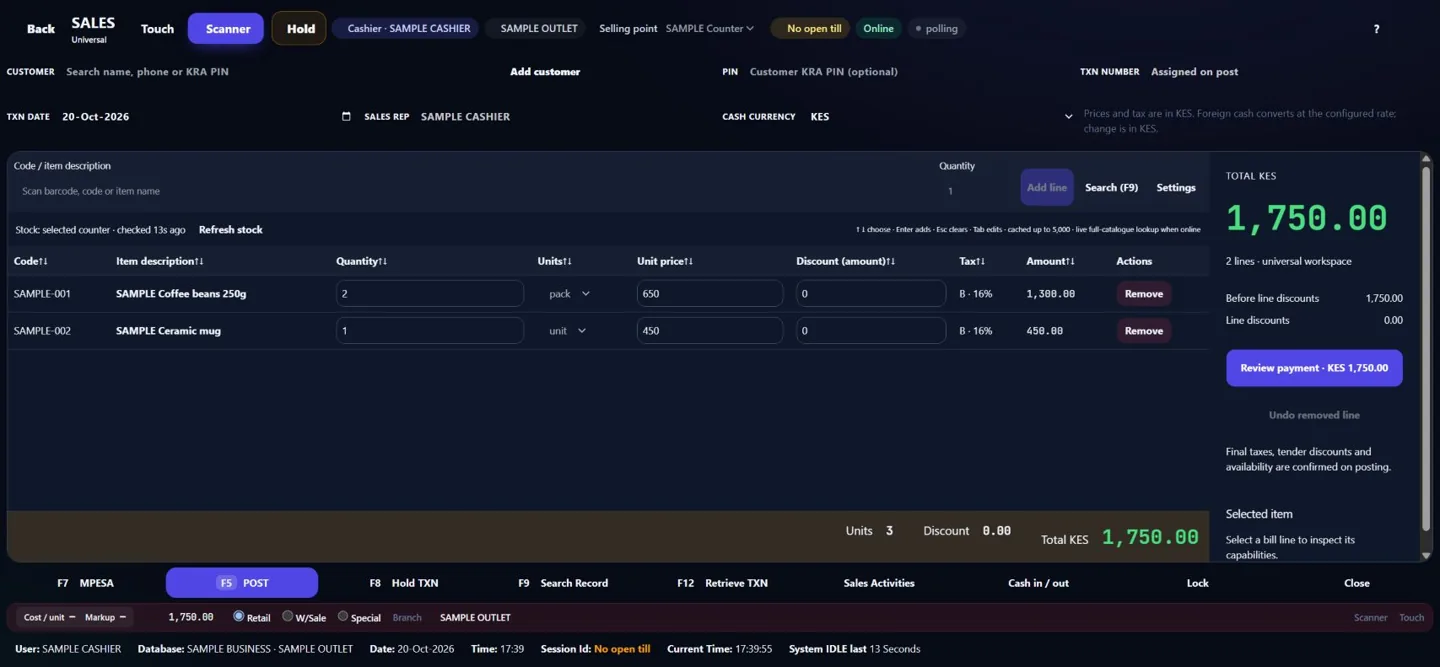
 KaziERP
LESS SWITCHING. MORE VISIBILITY.
Sell at the counter. Follow stock across your outlets. Review the shift and understand the figures. One connected workspace, built around the way your team works.
No card at signup. Account review and setup before activation.
Request a quotation ↗info@kaziware.com0723 250 7310750 085 424
ONE CONNECTED WORKSPACE
From the trading floor to the figures. Scroll through three current SAMPLE views, then explore each screen below.
EXPLORE THE CONNECTED WORKSPACE
Current product screens with fictional SAMPLE data. Select a view or play the 3D tour. Available workflows depend on your plan, rights and setup.
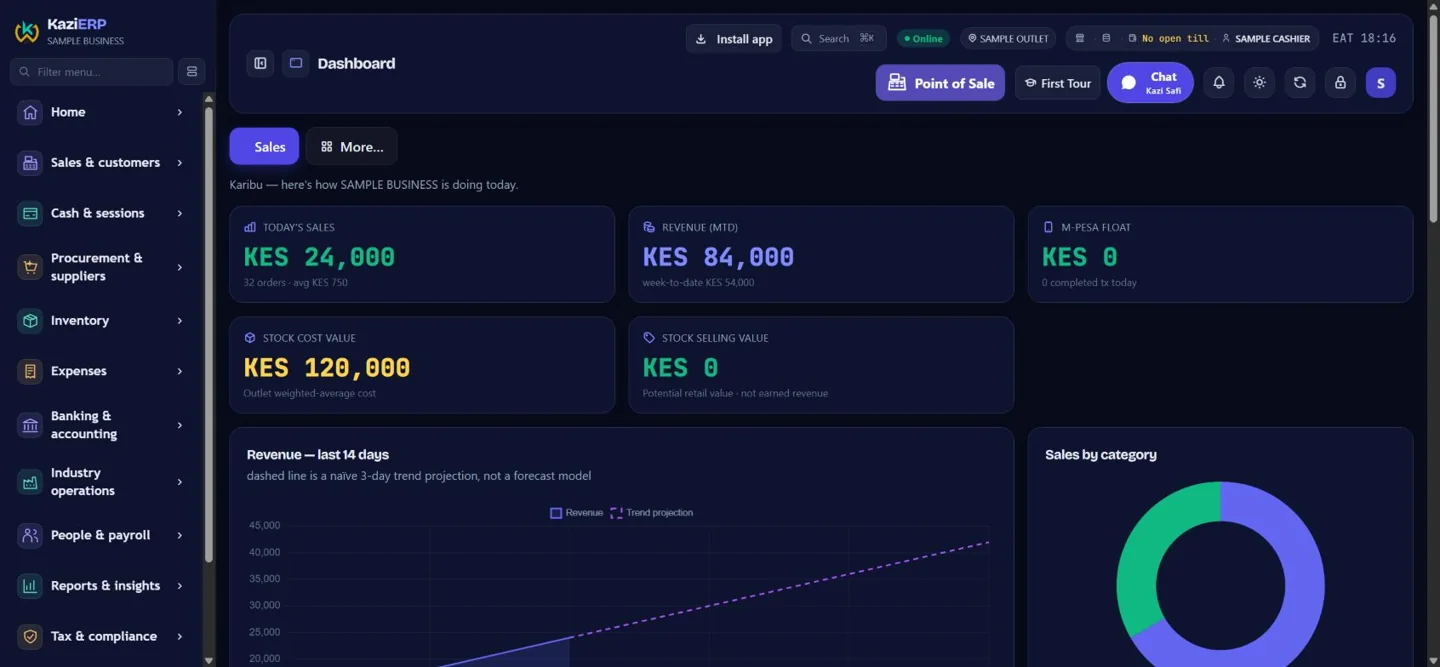
Sales, stock and performance in one view. Review the figures for the selected outlet.
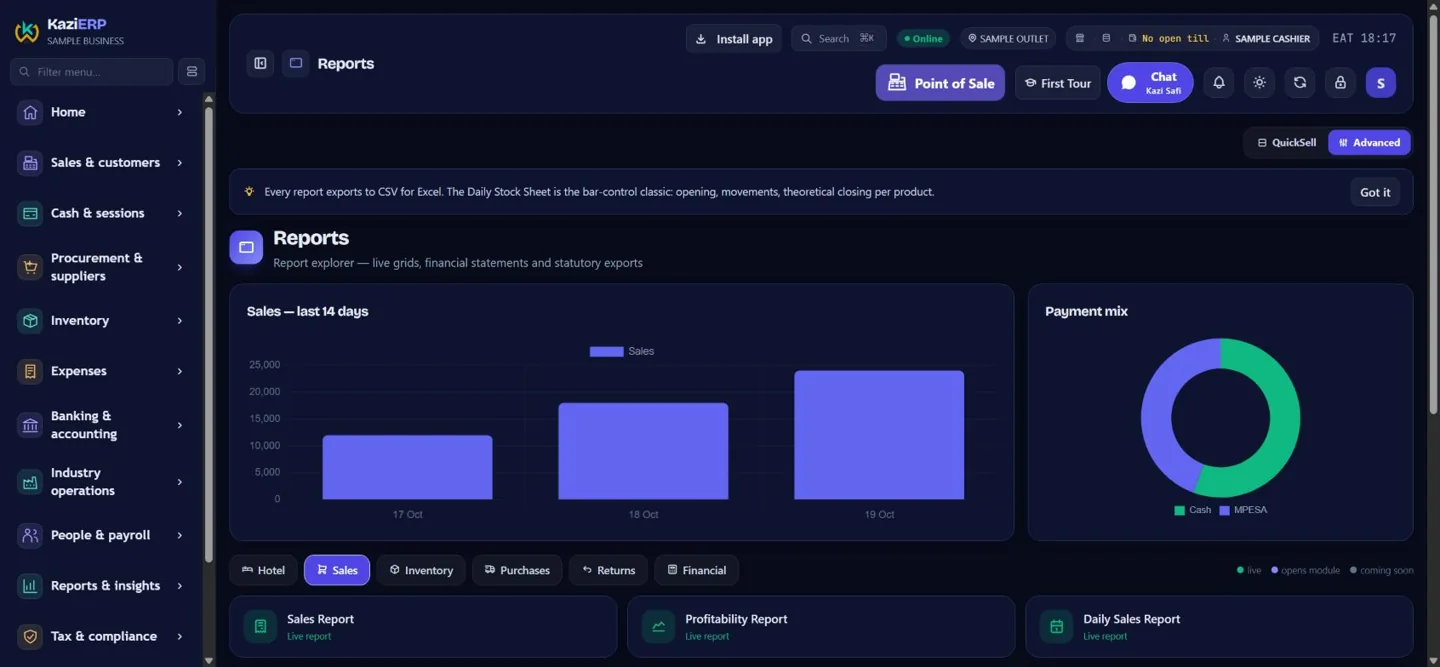
Explore sales and payment mix, with the configured report catalogue at hand.
Find items, adjust the bill and review payment before completing a sale.
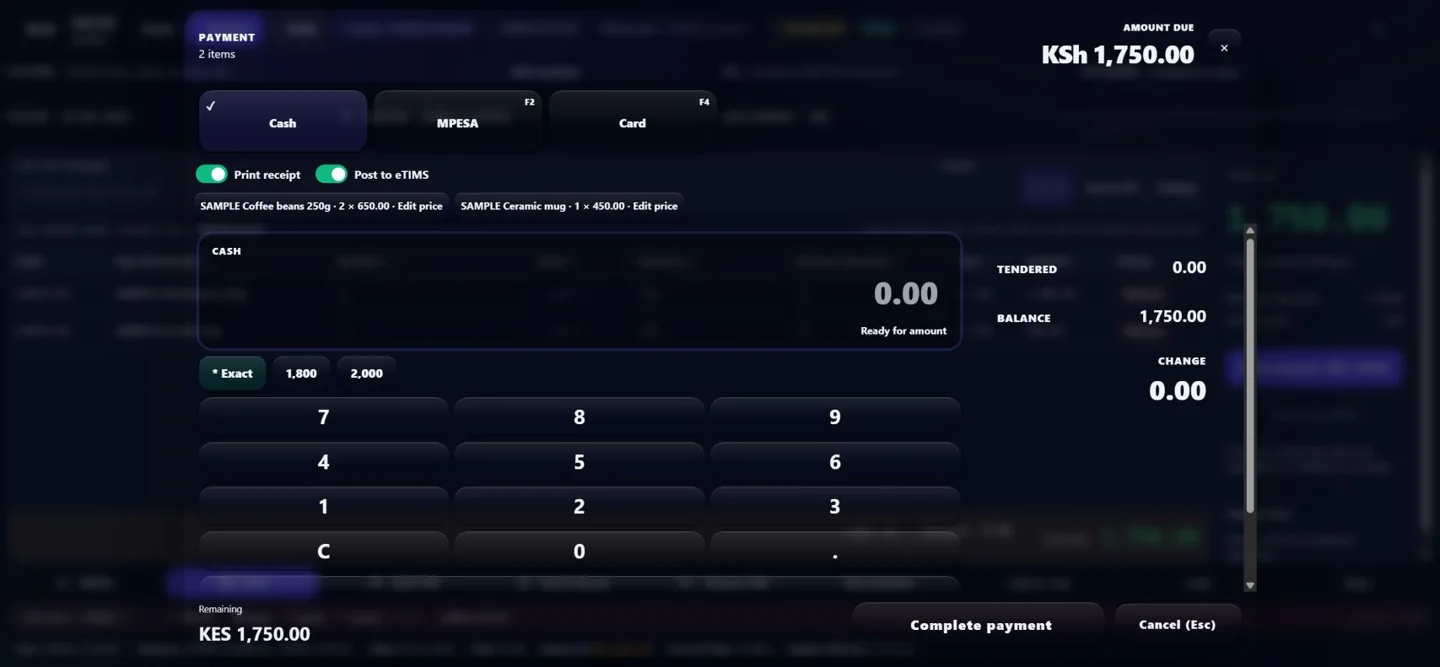
Choose the configured tender and check the amount due. Provider status stays explicit.
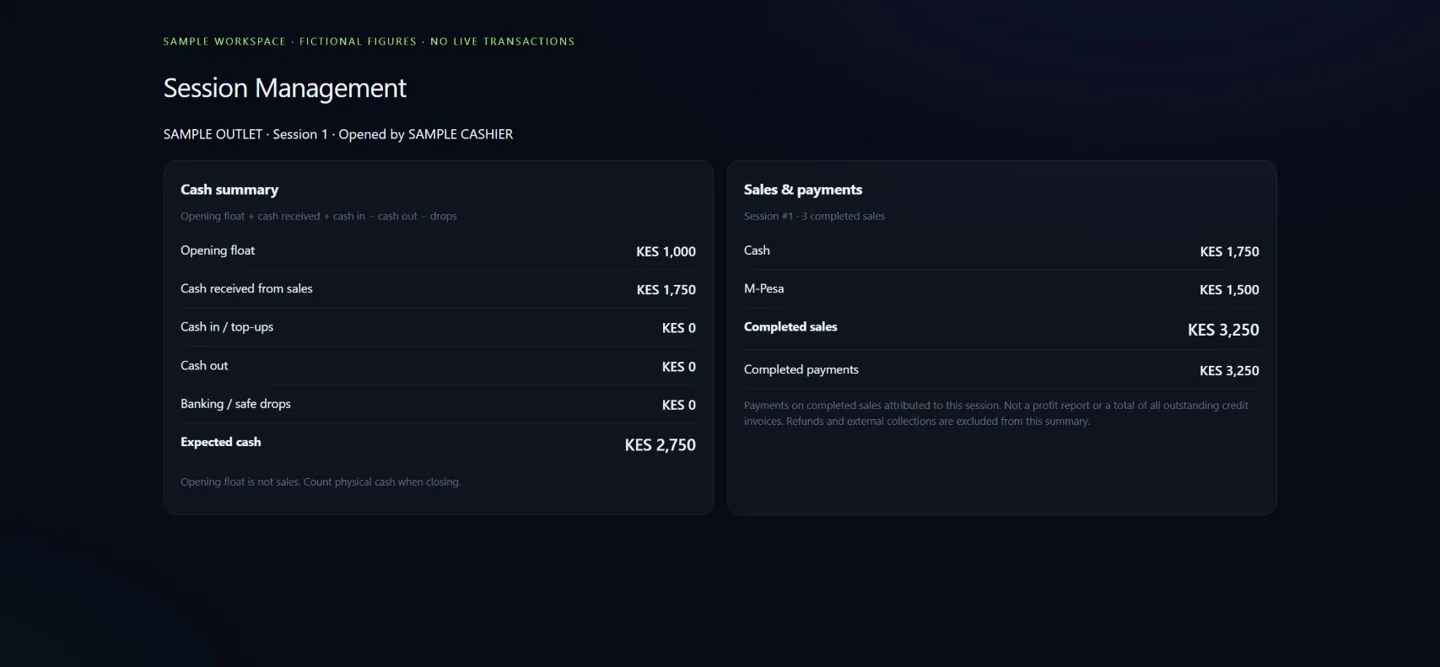
Separate sales, collections and opening float when reviewing a shift.
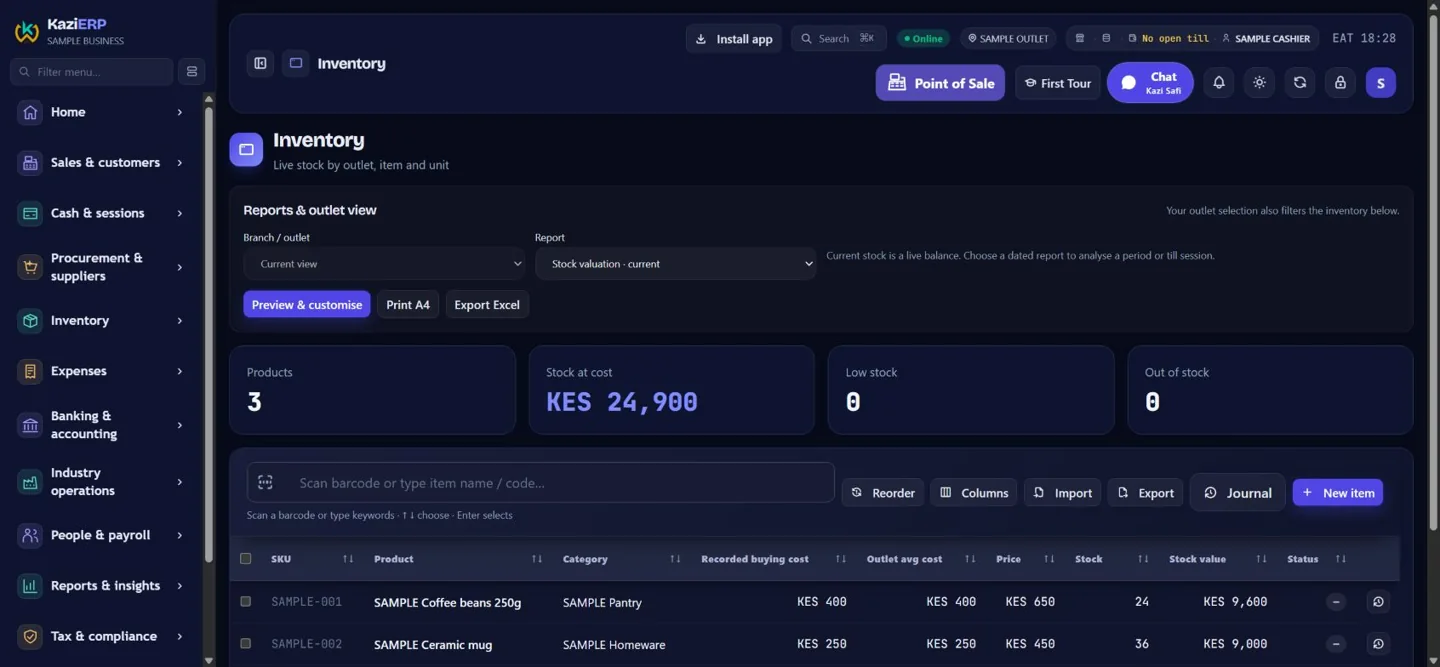
Follow quantities, weighted-average costs and stock value for the selected outlet.
Motion is optional. Pause, focus or leave the tour to stop it. With reduced motion enabled, screens change without 3D movement.
SEE THE PRODUCT
A short, guided video of current SAMPLE workspaces: build a bill, review payment, review the shift and explore reports. This is a narrated-on-screen product tour, not a recording of a live payment.
Visit the Kazi ERP YouTube channel ↗Kazi Pesa supplies business SMS evidence; delivery does not automatically verify or create a payment. Fiscal and printer integrations need separate configuration.
THE WORK BEHIND EVERY SALE
Explore the connected workflow through current Kazi screens. All items and amounts shown are fictional SAMPLE data.
Find items by barcode or name. Review quantities, prices and the amount due in the scanner or touch workspace.
Watch the guided demo →Review the bill and choose a configured payment method. Pending requests, SMS evidence and confirmed payments remain distinct.
Meet Kazi Pesa →Review sales, collections and expected cash separately. Follow the selected outlet’s stock and explore the available reports.
Explore the current screens →YOUR BUSINESS, IN FOCUS
A visual example of sales, stock and customer trends. Explore the pattern, then ask us to demonstrate the reports available for your business.
Fictional figures. Not KaziWare revenue, customer growth, uptime or a forecast.
KES 84,000Sample period 6 · scenario A
Example allocation, not live receipts or payment verification.
128 fictional active customers
A sample item’s available quantity. Actual stock follows the selected outlet and selling point.
Provider confirmation and fiscal status remain distinct.
| Period | Sales (KES) | Active customers |
|---|---|---|
| 1 | 40,000 | 50 |
| 2 | 46,000 | 65 |
| 3 | 50,000 | 70 |
| 4 | 60,000 | 88 |
| 5 | 72,000 | 108 |
| 6 | 84,000 | 128 |
A WORKSPACE THAT FITS YOUR TRADE
Start with the work your team does every day. We confirm the enabled scope and integrations during setup.
Barcode or touch selling. Outlet stock, purchasing and controlled transfers.
POS · Stock · PurchasingTables, unpaid bills, cashier settlement and Captain Orders to configured kitchen/bar printers.
Tables · Captain Orders · SessionsDiscuss front-desk, folio and hospitality workflows for your property.
Hospitality · Documents · FinanceProduct units, batch and expiry visibility within your configured workspace.
Catalogue · Batches · Access controlsQuotations, invoices, customer and supplier ledgers, and expense documents.
Invoicing · AR/AP · ExpensesReview the operational workflows and add-on configuration your business requires.
Operations · Documents · ReportingRetail · Supermarket / Retail · Supermarket · Mini-Mart / Convenience Store · Wholesale · Distributor · Wines & Spirits · Hardware & Building Supplies · Electronics & Appliances · Mobile Phones & Accessories · Clothing & Boutique · Shoes & Leather Goods · Furniture & Homeware · Books & Stationery · Beauty & Cosmetics · Jewellery & Accessories · Auto Parts & Accessories · Online Store / E-commerce · General Trading
Bar & Restaurant · Restaurant · Bar / Pub / Lounge · QSR · Cafe · Bakery & Confectionery · Butchery & Meat Shop · Grocery / Fresh Produce · Catering & Events · Hotel · Lodge / Resort · Guest House / B&B
Pharmacy / Pharmaceutical · Medical Clinic · Hospital / Nursing Home · Dental Clinic · Laboratory / Diagnostics · Veterinary Clinic / Supplies · Optical Shop · Salon / Barber Shop · Spa / Massage / Wellness · Gym / Fitness Centre
Agrovet / Farm Inputs · Agriculture / Farming · Dairy / Milk Products · Poultry / Livestock · Fishing / Fish Products · Manufacturing · Food Processing · Textiles / Tailoring · Printing & Packaging
Transport & Logistics · Courier / Delivery Services · Travel Agency / Tour Operator · Car Hire / Vehicle Leasing · Petrol / Service Station · Garage / Vehicle Repair · Laundry / Dry Cleaning · Cleaning / Waste Services · Construction / Contractor · Real Estate / Property Management · Professional / Consulting Services · ICT / Software Services · Repair / Maintenance Services · Security Services · Entertainment / Recreation
School / Training Institution · Church / Religious Organisation · NGO / Community Organisation · SACCO / Cooperative · Other
FROM THE FLOOR TO THE FIGURES
Scanner and touch tills, unpaid bills and a payment workspace built around the amount due.
Stock cards, counts, purchase workflows and controlled outlet transfers with recorded history.
Responsible staff, recorded shift totals, customer/supplier ledgers and expense vouchers.
Supported receipt, voucher and Captain Order outputs, with A4/PDF and spreadsheet options.
First Tour and Kazi Safi offer reviewed, read-only guidance and safe sample practice.
Discuss payroll, hospitality and logistics scope according to your business configuration and plan.
MEET THE COMPANION APP
Capture selected business SMS on a configured Android phone and follow delivery to your ERP.
Evidence is not payment confirmation. SMS delivery does not automatically create or verify a payment. Confirmation and allocation follow the authorized workflow.
Ask about Kazi Pesa ↗Business SMS evidence
SET UP FOR YOUR BUSINESS
Every business gets its assigned address. Existing staff sign in through that business address.
Choose your business category and submit your details for review.
Confirm outlets, users, catalogue and the integrations you need. M-Pesa, eTIMS and direct printing require their own setup.
Use guided sample practice and review the workflows with your team before live trading.
ONE PLATFORM. A PLAN FOR YOUR NEXT STAGE.
Connect sales, stock, people and finance around the way your business works. Compare capacity, explore the workflows and estimate the value for your operation.
One outlet, one clear picture.
KES 2,500
per business / month
Bring counter sales, stock and daily controls into one workspace.
Confirm enabled modules and integrations during setup.
Start your trial ↗Explore all capabilities ↓Connect your outlets and team.
KES 6,500
per business / month
Compare performance and coordinate stock across your configured outlets.
Confirm enabled modules and integrations during setup.
Start your trial ↗Explore all capabilities ↓A wider operation, clearer control.
KES 12,000
per business / month
Coordinate more outlets and specialist workflows with scoped access.
Confirm enabled modules and integrations during setup.
Start your trial ↗Explore all capabilities ↓Scope the operation you need.
Let's talk.
Modules, capacity and commercial terms by quotation.
Review specialist modules, integrations and rollout requirements with us.
Confirm enabled modules and integrations during setup.
Discuss your setup ↗Explore all capabilities ↓14-day trial · No card at signup · Account review before activation. Annual totals are shown for the full year. Confirm taxes and any provider or hardware charges before purchase. Specialist modules and add-ons are scoped during setup.
THE WORKSPACE BEHIND THE PACKAGE
Explore the system by job. Explore available workflow families and confirm the modules that fit your subscription and business setup.
Scanner / touch POS, code and description search, direct quantities, units, discounts, held sales, invoices and payment workflows.
Products, categories, buying / selling units, outlet prices, stock cards, batches, expiry and stock visibility.
Transfer approvals, dispatch / receiving, stock-taking, daily sheets, adjustments and disposal workflows.
Requisitions, approvals, purchase orders, goods receiving, invoice matching and supplier account workflows.
Customer accounts, debt documents, collections, allocations, deposits, statements and thermal / A4 documents.
GL journals, chart of accounts, AR / AP, expense approvals, vouchers, banking reconciliation and cheque workflows.
Opening / closing controls, tender reconciliation, cash in / out, session history, sales-roll and selling-point summaries.
Sales, stock, purchasing and financial reporting, exports, outlet comparisons and recorded staff activity.
Tables, bills, kitchen display, Captain Orders, kitchen / bar routing, service modes, recipes and tips workflows.
Reservations, rooms, stays, guest-service charges, departmental reporting and settlement workflows.
Recipe / material requirements, production operations and inventory movement workflows.
Employee records, attendance / leave, payroll, payslips and statutory outputs. Confirm country rules and payroll readiness.
Loyalty, member accounts, customer pipeline and configured customer portal workflows.
Fixed-asset records, depreciation workflows, access controls and compliance workspaces.
Scoped transport operations, dispatch, fleet and freight / operational finance workflows.
Configured provider collection / reconciliation; manual references where permitted. Kazi Pesa delivers selected business SMS evidence, not provider verification.
Configured fiscal submission, status tracking, exception alerts and original-receipt recovery. Acceptance depends on the provider.
Thermal / A4 receipts, account documents, reports, payment instructions and supported local printer routing.
First Tour practice, reviewed read-only Kazi Safi guidance, staff rights and controlled outlet access.
Sales, stock, account and reporting workflows with staff permissions and outlet-scoped access. Your plan sets capacity; your configuration sets the working scope.
Hospitality, hotel, production and payroll need industry setup and readiness review. Logistics has a separate add-on entitlement; People extensions may be priced separately.
M-Pesa, eTIMS and printers require supported accounts or devices. Kazi Pesa SMS delivery is evidence, not payment confirmation. Provider, hardware and setup charges are confirmed separately.
PUT YOUR OWN NUMBERS TO WORK
Value less repeated entry, faster reconciliation and better visibility using your own assumptions. This is a planning estimate, not measured savings or a guarantee.
Illustrative starting inputs: 30 minutes a day, 26 days a month and KES 250 per hour. Time value may free capacity without reducing cash expenses. Avoid counting the same benefit twice.
YOUR ILLUSTRATIVE ESTIMATE
Monthly benefit = hours × working days × hourly value + other benefit. Monthly operating cost = subscription equivalent + other monthly costs. First-year ROI = (12 × benefit − annual operating cost − setup) ÷ (annual operating cost + setup) × 100. Setup recovery = setup ÷ positive monthly net value; annual subscription is paid upfront and recovery timing can differ.
LET’S TALK ABOUT YOUR BUSINESS
Tell us what you need. We’ll use your details to discuss suitable products, setup and a quotation.
REQUEST FOR QUOTATION
Choose your business and submit your details. We review the request and arrange account setup. The trial runs for 14 days; no card is required at signup.
No. It captures and delivers selected business SMS evidence. Delivery acknowledgement is not provider confirmation that money was received.
M-Pesa and eTIMS need the relevant business setup and provider connection. Direct printing needs supported printers and a configured local connection.
Supported till workflows can retain work for synchronization. Provider confirmation and fiscal submission still need connectivity. We demonstrate supported offline limits during setup.
Tell us your country and requirements. Kenya-specific integrations do not establish tax or payroll support in another country; we confirm scope first.
Use the business address supplied during setup. Contact info@kaziware.com if you need help finding your assigned address.
READY FOR A CLEARER WORKING DAY?
KAZI SAFI · SUPPORT
Reviewed public guidance. No access to your tenant records or automatic transactions.
Choose a topic. This guide does not use an external AI provider.
Choose a topic for guidance, or submit a support ticket below.
Source: KaziWare public support guide · revision 2026-10-20.Do not include PINs, passwords, keys, personal customer records or payment details. No files or conversation history are sent.
Contact info@kaziware.com · 0723 250 731